Server-hosting
Port forwarding
The server sends and receives packages (“game”, “voice”, “ping”). So in order for the server to be accepted by PROJECT kongor, you must forward these ports on your computer and on your router.
With UseProxy set to true in COMPEL.json
- Game:
21235-21335(UDP) - Voice:
21435-21535(UDP) - Ping
21234(UDP)
With UseProxy set to false in COMPEL.json (Not recomended)
- Game:
11235-11335(UDP) - Voice:
11435-11535(UDP) - Ping
11234(UDP)
PS: The port range may be set to the amount of server instances you wish to run
The new region auto-select feature is based on ping responses, however the masterserver pings COMPEL, not any of the other processes, which then pongs back. The port on which this happens is either 11234 (plus offset from config) if you don’t use the proxy or 21234 (plus offset from config) if you do use the proxy, and the reasoning for using these ports is that you can just extend your already existing range of forwarded ports to add one more port at the lower end. if using the above range, everything should be set.
Router guides
PfSense
- Goto
Firewall -> Alias -> Ports - add
- Enter Game and Voice ranges in format
xxxx:yyyy - give it a name like
hon_ports - save
- go to
Firewall -> Nat -> Add - in Destination port range “From port and To port” via “custom” to
hon_ports - in Redirect target IP enter your servers IP
- in Redirect target port enter
hon_ports - SAVE
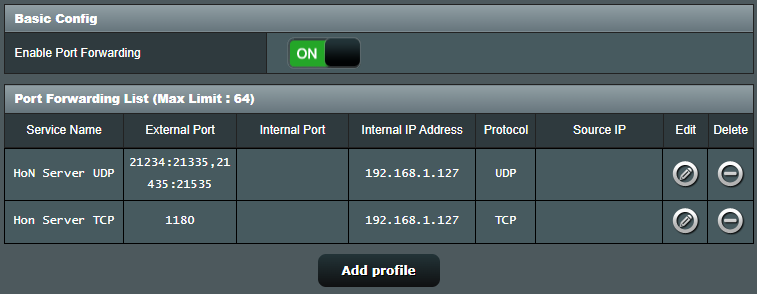
Asus Router
- Go to
WANunderAdvanced Settings - Go to tab
Virtual Server / Port Forwarding - Activate
Enable Port Forwarding - Click
Add profileand specify the required ports and internal server ip - Result should look similar to this: